What a printed recipe includes
When you print a recipe, Souschef uses:- Your current serving size — whatever you have the recipe scaled to when you print
- Your measurement preference — the units currently shown in the app
- The recipe title
- The recipe photo
- Prep time
- Cook time
- Ingredients
- Numbered step-by-step instructions
- A QR code that links back to the recipe in Souschef
- A printable checklist you can tick as you shop or cook
📸 Screenshot needed: an example of a printed Souschef recipe showing the title, photo, prep/cook times, ingredients, numbered steps, and QR code.
How to print a recipe
1
Open the recipe
Tap the recipe in your library.
2
Adjust the serving size and units (optional)
Change the serving size or measurement units before printing — the print output uses whatever’s shown on screen.
3
Open the recipe menu
Tap the ⋯ button in the top right of the recipe.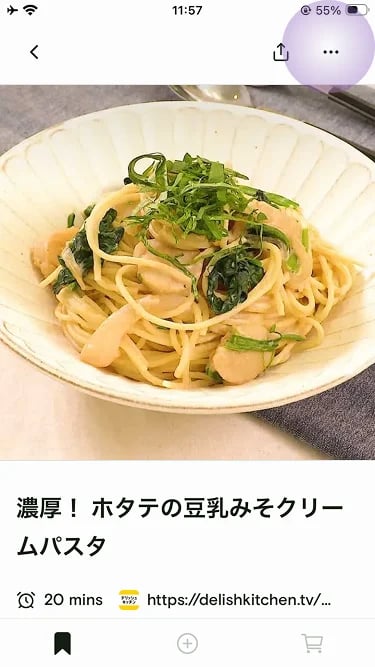
4
Tap Print recipe
Choose Print recipe from the menu.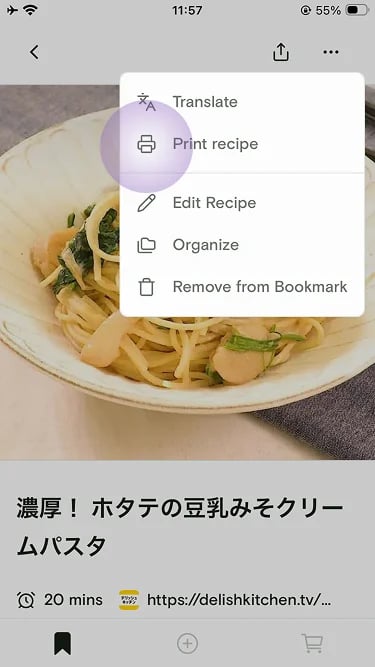
5
Send it to your printer
Use your device’s standard print sheet to send the recipe to an AirPrint or Google Cloud Print–compatible printer, or save the recipe as a PDF to keep or share.