Paste recipe text
1
Copy the recipe text
Copy the recipe from wherever you found it — a Notes app, a text message, a webpage, an email, anywhere.
2
Open Souschef and tap '+'
Tap the + button on your library screen to start a new import.
3
Choose 'Text'
Select Text from the import options and paste your copied recipe into the text field.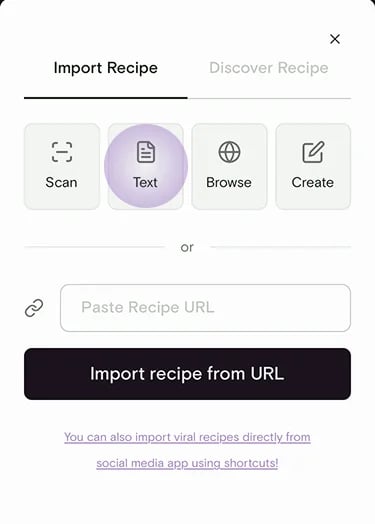
4
Let AI extract the recipe
Souschef’s AI reads the text and pulls out the title, ingredients, quantities, and step-by-step instructions — even if the original text was a messy paragraph.
5
Edit and save
Review the extracted recipe. Tap any field to fix a typo, adjust a quantity, or add a missing step. Tap Save when you’re happy.
Paste from ChatGPT or Claude
If you use ChatGPT, Claude, or another AI chat app to brainstorm meals, copy the recipe response and import it with Text. Souschef works best when the copied recipe includes a title, ingredients, servings, and step-by-step instructions.See prompt ideas and the full guide
Learn how to ask AI for recipes based on expiring ingredients, pantry staples,
leftovers, dietary preferences, or meal prep goals.
Create a recipe manually
Prefer to type it out yourself? You can build a recipe from scratch, no source required.1
Tap '+' and choose 'Create'
From the import menu, choose Create to start with a blank recipe.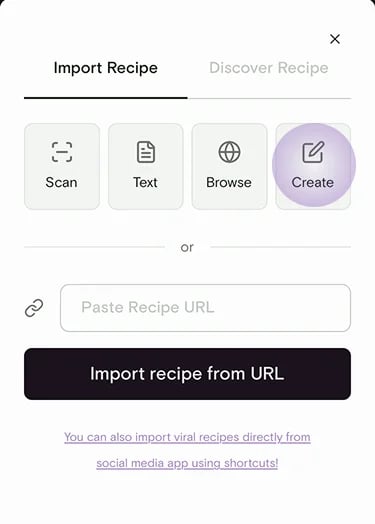
2
Fill in the details
Add a title, servings, prep and cook times, ingredients, and step-by-step
instructions. Add a photo if you have one.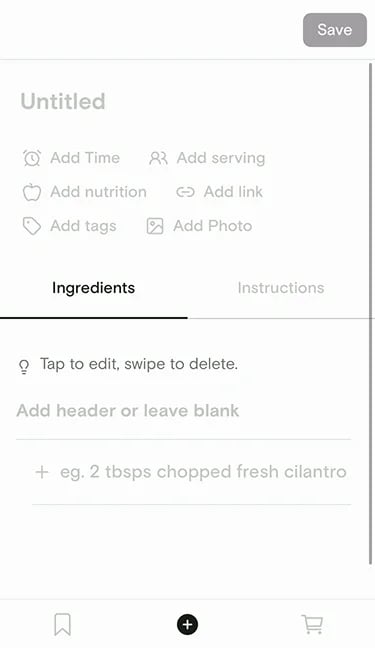
3
Save it to your library
Tap Save. Your recipe is now in your collection, ready to cook, scale,
add to your shopping list, and share — just like any imported recipe.
Recipes you create manually work with every Souschef feature: Cooking
Mode, smart timers, serving
adjustment, shopping lists,
nutrition, AI tagging, and more.