Included in Free plan This feature is included in the free version of Souschef. Not everyone cooks in the same units — and that’s perfectly fine! Souschef lets you convert ingredient measurements on the fly so you can cook in whatever units feel most natural to you. Found a great recipe from a UK food blog that uses grams? No problem. Following an American recipe but you only own a kitchen scale? Souschef has you covered. Shared recipe links also let viewers switch between supported measurement systems (Metric, US Customary, and more) in the browser.

How to convert measurements

1

Open a recipe

Tap any recipe in your Souschef library to open it.
2

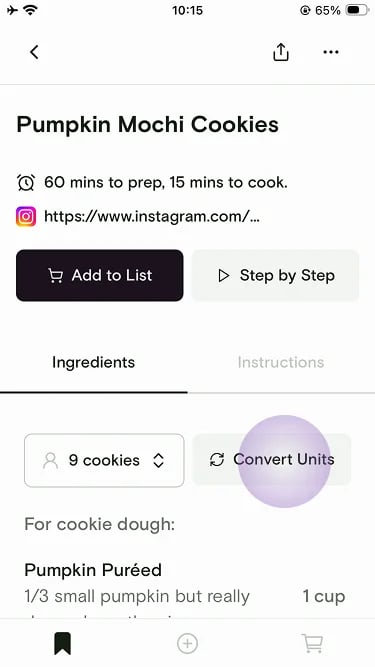
Tap Convert Units

On the Ingredients tab, tap Convert Units.Recipe detail with the Convert Units button highlighted on the Ingredients tab
3

Set your preference and apply

Choose your base measurement system (Imperial or Metric), optionally select cooking tools you own so common units like cups or teaspoons stay unconverted, then tap Apply.Measurement Preference sheet with Imperial selected and tbsp/tsp and cup tools selected
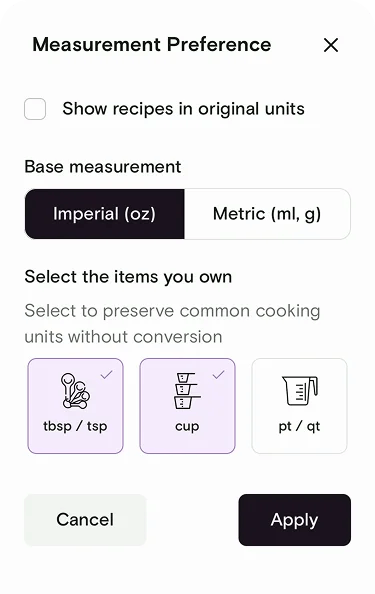
Turn on Show recipes in original units if you want to keep each recipe in the units it was imported with.
Conversions are calculated based on standard cooking measurements. For the most accurate results with dry ingredients like flour or cocoa powder, a kitchen scale is always your best bet — volume measurements can vary depending on how tightly packed the ingredient is.
This feature is especially handy when following a recipe from another country — just switch to your preferred units and cook with confidence, no mental arithmetic required.

Still need help?

If you have questions or run into anything unexpected, our team is happy to help. Contact support
Related articles