
What you can search for
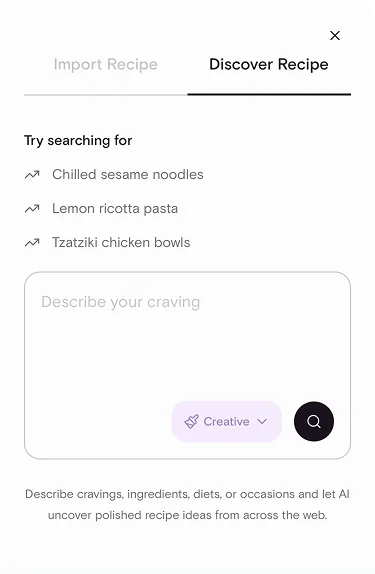
Describe your meal in whatever way feels natural. AI Discovery is designed to understand:- Ingredients — e.g., “chicken thighs and yogurt” or “whatever’s in my Pantry”
- Cravings — e.g., “something spicy and comforting” or “crunchy and fresh”
- Diets — e.g., “high protein,” “vegan,” “gluten free”
- Occasions — e.g., “weeknight dinner for two,” “party appetizer,” “kid-friendly lunch”
Choose a creativity level
Before running a search, pick how adventurous you want the results to be:- Precise — sticks closely to your exact prompt. Best when you have a specific dish in mind.
- Balanced (default) — a good mix of closely matched and slightly more inventive suggestions.
- Creative — wider, more surprising results. Great for when you want inspiration.
The sources AI Discovery searches
Souschef generates search queries from your prompt and then searches across:- Recipe websites
- TikTok
- YouTube
Understanding the results
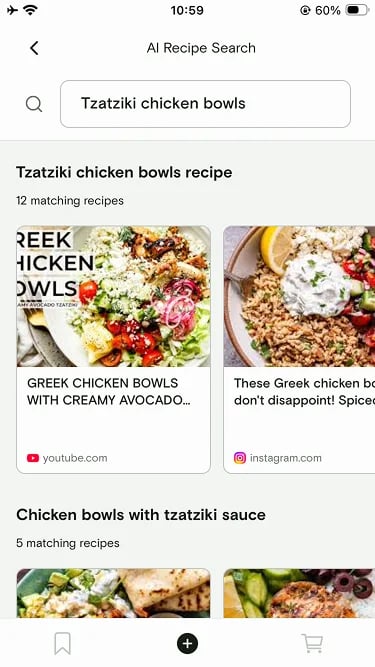
Results are grouped so you can scan them quickly:- Featured matches — the recipes AI Discovery thinks are the strongest fit for your prompt, shown at the top.
- Grouped results — the rest of the results, organized by source (websites, Instagram, TikTok, Facebook, YouTube) so you can pick the format you prefer.
Import a result into your library
Every result has two options:- Import directly — tap Import and Souschef pulls the recipe into your library the same way any other import does. Ingredients, steps, tags, and nutrition are extracted automatically.
- Open the original link — tap the result to view the source (a website, Instagram post, TikTok, Facebook post, or YouTube video) in its original app or browser.
How to run an AI Discovery search
1
Open AI Discovery
Tap the Discover (or Search) tab in Souschef.
2
Describe what you want
Type your ingredients, cravings, diet, or occasion into the prompt field.
3
Pick a creativity level
Choose Precise, Balanced, or Creative.
4
Review featured and grouped results
Browse the featured matches at the top, then scroll through grouped results by source.
5
Import or open a recipe
Tap Import to save a recipe, or tap the result to open the original source.
Related articles
- Supported import sources
- Import from Facebook
- Import from Instagram
- Import from TikTok
- Import from YouTube