Included in Free plan Importing from Facebook is included in the free version of Souschef. Souschef can save any recipe you spot on Facebook — from a friend’s shared post to a viral cooking video or reel. Share the post to Souschef (or paste its URL) and Souschef extracts recipe information from the post’s caption or description and, when available, the video’s spoken audio — then builds a full, structured recipe you can cook, scale, and add to your shopping list.
Souschef works best when the recipe is included in the post caption (or description) or spoken aloud in the video. If a post only shows the finished dish without explaining the recipe, Souschef may not have enough information to create a complete recipe.

How to import a recipe from Facebook

There are two ways to import a Facebook recipe. Pick whichever works best for you.
Already looking at a recipe post in the Facebook app? Share it straight to Souschef.
1

Find a recipe and tap Share

Open the post, video, or reel you want to save, then tap the Share button.Facebook reel with the Share button highlighted

2

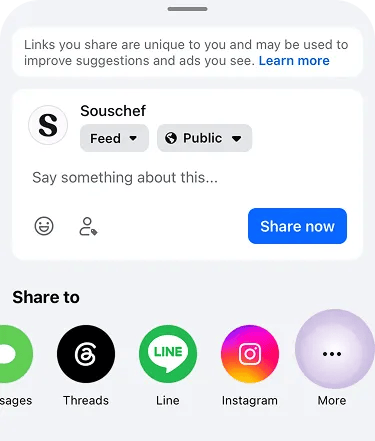
Tap More

In the share menu, tap More under Share to to open your phone’s share sheet.Facebook share menu with More highlighted
3

Tap the Souschef icon

Tap the Souschef icon in the share sheet. Souschef will open and start extracting the recipe automatically.Share sheet with the Souschef app icon highlightedDon’t see Souschef in the share sheet? Follow Add Souschef to your share menu.

4

Review and save

Souschef extracts from the caption (or description) and spoken audio when available — this usually takes up to 30 seconds. Review the extracted recipe, edit anything that needs tweaking, and tap Save.

Facebook recipes in AI Discovery

Facebook is one of the sources AI Discovery searches when you describe what you’re in the mood for. If a Facebook post is a strong match for your query, it will appear right alongside results from Instagram, TikTok, YouTube, and recipe websites — and you can import it into your collection with a single tap.
For reels and video posts, keep Souschef open while it processes the recipe. Audio analysis takes a bit longer than a caption-only extraction, but the results are much richer.

Troubleshooting

If a Facebook import came back empty or is missing details, see Why a recipe import might fail. You can also edit any recipe after saving — just tap Edit on the recipe.

Still need help?

Our team is always happy to assist — contact support.