> ## Documentation Index
> Fetch the complete documentation index at: https://docs.trysouschef.com/llms.txt
> Use this file to discover all available pages before exploring further.
# Set and manage recipe timers in Souschef cooking app
> Souschef automatically detects times mentioned in recipe steps and lets you start a countdown with one tap — no switching apps needed.
Included in Free plan
This feature is included in the free version of Souschef.
When a recipe step says something like "bake for 25 minutes" or "let the dough rest for 1 hour," Souschef highlights that time as a tappable timer. No more unlocking your phone, hunting for the clock app, and trying to remember what you just read — everything stays right where you're cooking.
## Starting a timer
Timers live right inside [Cooking Mode](/using/cooking-mode), so they're always within reach:
As you follow along in Cooking Mode, look for **highlighted time mentions** in the step text — these appear underlined with a timer icon.
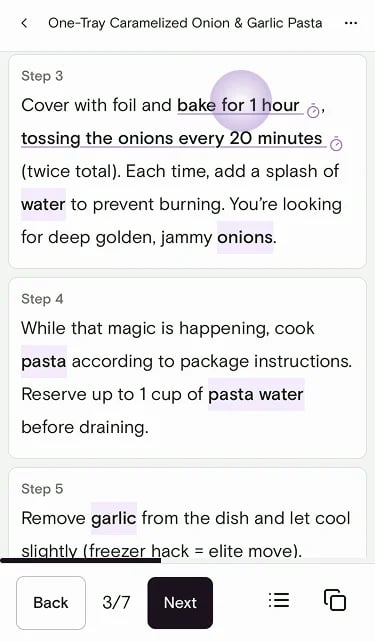 Tap the highlighted time to open the timer controls. Confirm the duration, then tap play to start the countdown.
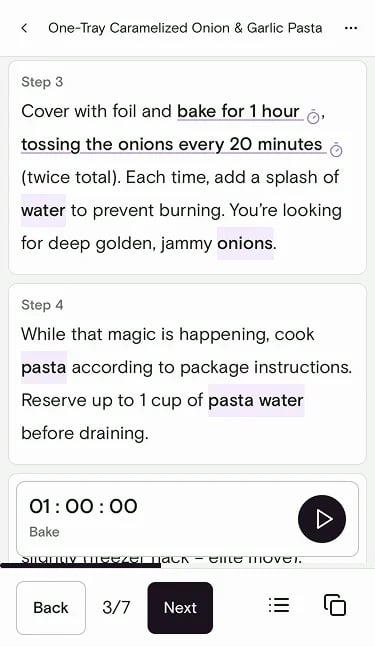 The timer runs directly in the app — you never have to leave your recipe to manage it.
## Add a timer manually
You can also create a timer when a recipe doesn't include a time mention, or when you want a custom countdown:
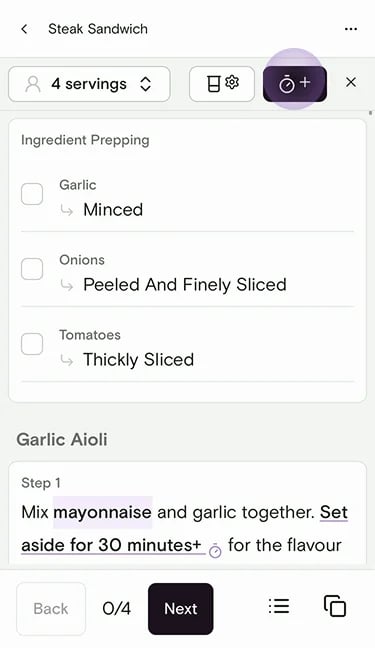
In Cooking Mode, tap the timer button (clock with a plus) at the top of the screen.
The timer runs directly in the app — you never have to leave your recipe to manage it.
## Add a timer manually
You can also create a timer when a recipe doesn't include a time mention, or when you want a custom countdown:
In Cooking Mode, tap the timer button (clock with a plus) at the top of the screen.
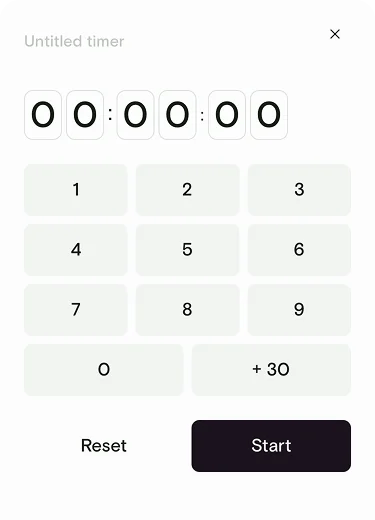
 Enter the time with the keypad (or tap **+ 30** to add 30 seconds), optionally name the timer, then tap **Start**.
 ## Managing multiple timers
Many recipes have overlapping steps, and Souschef handles that gracefully:
* You can run **several timers at the same time** — one for the pasta water, one for the sauce, one for the bread in the oven.
* All active timers stay visible without leaving Cooking Mode, so you can keep an eye on everything at a glance.
* If you open a [second recipe window](/using/cooking-mode#during-cooking), your timers continue running in the background.
If a recipe has overlapping steps, start the longer timer first so both finish close together — it makes timing your meal much easier!
***
## Still need help?
If you have questions or run into anything unexpected, our team is happy to help. [Contact support](/troubleshooting/contact-support)
***
**Related articles**
* [How to use Cooking Mode](/using/cooking-mode)
* [Use the preparation checklist](/using/prep-checklist)
* [Adjust servings](/using/adjust-servings)
## Managing multiple timers
Many recipes have overlapping steps, and Souschef handles that gracefully:
* You can run **several timers at the same time** — one for the pasta water, one for the sauce, one for the bread in the oven.
* All active timers stay visible without leaving Cooking Mode, so you can keep an eye on everything at a glance.
* If you open a [second recipe window](/using/cooking-mode#during-cooking), your timers continue running in the background.
If a recipe has overlapping steps, start the longer timer first so both finish close together — it makes timing your meal much easier!
***
## Still need help?
If you have questions or run into anything unexpected, our team is happy to help. [Contact support](/troubleshooting/contact-support)
***
**Related articles**
* [How to use Cooking Mode](/using/cooking-mode)
* [Use the preparation checklist](/using/prep-checklist)
* [Adjust servings](/using/adjust-servings)