> ## Documentation Index
> Fetch the complete documentation index at: https://docs.trysouschef.com/llms.txt
> Use this file to discover all available pages before exploring further.
# How to print recipes from Souschef
> Print any Souschef recipe with your current serving size, measurement preference, prep and cook times, ingredients, numbered instructions, and a QR code.
Included in Free plan
This feature is included in the free version of Souschef.
Sometimes paper just works better. Whether you like keeping a printed copy in a family cookbook, cooking without a phone in the kitchen, or handing a recipe to someone who prefers it on paper, Souschef makes it easy to print any recipe from your library in a clean, kitchen-ready format.
## What a printed recipe includes
When you print a recipe, Souschef uses:
* Your **current serving size** — whatever you have the recipe scaled to when you print
* Your **measurement preference** — the units currently shown in the app
* The recipe **title**
* The recipe **photo**
* **Prep time**
* **Cook time**
* **Ingredients**
* **Numbered step-by-step instructions**
* A **QR code** that links back to the recipe in Souschef
* A **printable checklist** you can tick as you shop or cook
📸 Screenshot needed: an example of a printed Souschef recipe showing the title, photo, prep/cook times, ingredients, numbered steps, and QR code.
## How to print a recipe
Tap the recipe in your library.
Change the [serving size](/using/adjust-servings) or [measurement units](/using/convert-measurements) before printing — the print output uses whatever's shown on screen.
Tap the **⋯** button in the top right of the recipe.
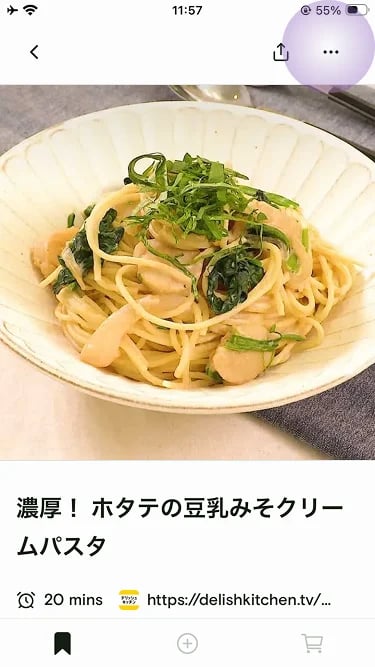 Choose **Print recipe** from the menu.
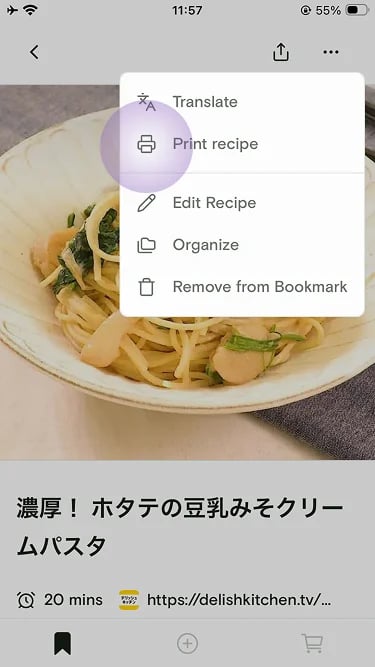 Use your device's standard print sheet to send the recipe to an AirPrint or Google Cloud Print–compatible printer, or save the recipe as a PDF to keep or share.
Save a printed recipe as a PDF and drop it into a shared folder to build a family cookbook that everyone can access.
## The QR code
Every printed recipe includes a QR code at the bottom. Scan it with any phone camera to open the live recipe link. If you have the app installed, you can jump into [Cooking Mode](/using/cooking-mode) for timers and step-by-step guidance. If someone doesn't have the app, the same link opens in Souschef's lightweight web viewer so they can still read the recipe, adjust servings, and switch measurement systems.
***
## Related articles
* [Adjust servings](/using/adjust-servings)
* [Convert measurements](/using/convert-measurements)
* [Cooking Mode](/using/cooking-mode)
* [Shopping List](/using/shopping-list)
* [Supported devices](/getting-started/supported-devices)
## Still need help?
If you have questions or run into anything unexpected, our team is happy to help. [Contact support](/troubleshooting/contact-support)
Use your device's standard print sheet to send the recipe to an AirPrint or Google Cloud Print–compatible printer, or save the recipe as a PDF to keep or share.
Save a printed recipe as a PDF and drop it into a shared folder to build a family cookbook that everyone can access.
## The QR code
Every printed recipe includes a QR code at the bottom. Scan it with any phone camera to open the live recipe link. If you have the app installed, you can jump into [Cooking Mode](/using/cooking-mode) for timers and step-by-step guidance. If someone doesn't have the app, the same link opens in Souschef's lightweight web viewer so they can still read the recipe, adjust servings, and switch measurement systems.
***
## Related articles
* [Adjust servings](/using/adjust-servings)
* [Convert measurements](/using/convert-measurements)
* [Cooking Mode](/using/cooking-mode)
* [Shopping List](/using/shopping-list)
* [Supported devices](/getting-started/supported-devices)
## Still need help?
If you have questions or run into anything unexpected, our team is happy to help. [Contact support](/troubleshooting/contact-support)