> ## Documentation Index
> Fetch the complete documentation index at: https://docs.trysouschef.com/llms.txt
> Use this file to discover all available pages before exploring further.
# How to translate recipes in Souschef with AI Recipe Translation
> AI Recipe Translation turns any recipe into another language while preserving the original. Supports English, Japanese, Spanish, French, and 10 more.
Included in Free plan
This feature is included in the free version of Souschef.
AI Recipe Translation lets you turn any recipe in your library into another language — in seconds — without losing the original. Souschef uses an AI model built specifically for recipe translation, so cooking terms, ingredient names, and technique language stay accurate across languages. Souschef creates a linked translated recipe, keeps the source recipe untouched, and clearly marks the translated version so you always know where it came from. Perfect for cooking a family recipe in the language it was written in, or for sharing a favorite with someone who speaks a different language.
## Supported languages
Recipes can be translated between any of these languages:
* English
* Japanese
* Spanish
* French
* German
* Italian
* Korean
* Chinese
* Portuguese
* Dutch
* Swedish
* Danish
* Finnish
* Polish
## What translation does
When you translate a recipe, Souschef:
* **Creates a linked translated recipe** — a new recipe in your library with all text (title, ingredients, steps, notes) in the target language.
* **Preserves the original** — your original recipe stays exactly as you had it. Translation never overwrites the source.
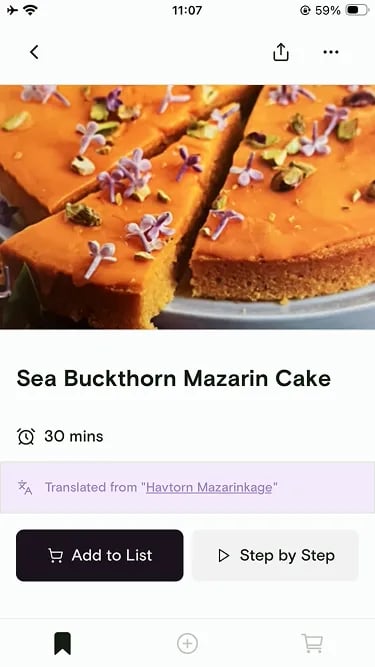
* **Displays "Translated from…"** — the new recipe shows a clear label linking back to the original so you always know its origin.
 ## How to translate a recipe
Tap the recipe in your library.
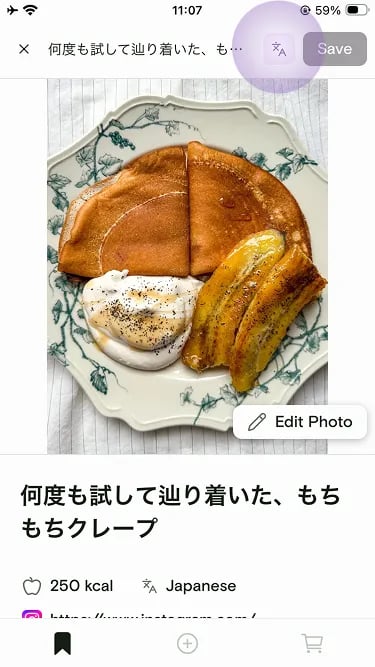
Tap the translate icon in the top bar.
## How to translate a recipe
Tap the recipe in your library.
Tap the translate icon in the top bar.
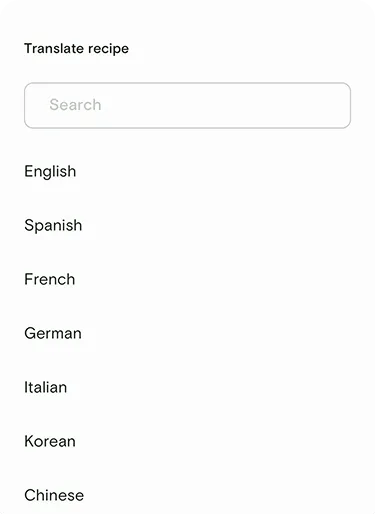
 Pick from the list of supported languages.
 Souschef creates a new, linked recipe in your library with the translated content. Tap **Save** to keep it.
You can translate the same recipe into multiple languages. Each translation is
a separate linked recipe, so a Japanese and Spanish version of the same dish
can live side by side in your library.
## Editing translated recipes
Translated recipes are fully editable just like any other recipe. If a phrase didn't land quite right or you want to swap in a more familiar cooking term, tap **Edit** and make it yours.
***
## Related articles
* [Convert measurements](/using/convert-measurements)
* [Organize and search](/using/organize-and-search)
## Still need help?
If you have questions or run into anything unexpected, our team is happy to help. [Contact support](/troubleshooting/contact-support)
Souschef creates a new, linked recipe in your library with the translated content. Tap **Save** to keep it.
You can translate the same recipe into multiple languages. Each translation is
a separate linked recipe, so a Japanese and Spanish version of the same dish
can live side by side in your library.
## Editing translated recipes
Translated recipes are fully editable just like any other recipe. If a phrase didn't land quite right or you want to swap in a more familiar cooking term, tap **Edit** and make it yours.
***
## Related articles
* [Convert measurements](/using/convert-measurements)
* [Organize and search](/using/organize-and-search)
## Still need help?
If you have questions or run into anything unexpected, our team is happy to help. [Contact support](/troubleshooting/contact-support)