> ## Documentation Index
> Fetch the complete documentation index at: https://docs.trysouschef.com/llms.txt
> Use this file to discover all available pages before exploring further.
# How recipe tagging works in Souschef — AI-suggested tags
> Souschef automatically suggests tags for every imported recipe — cuisine, meal type, diet, main ingredient, cooking method, and more. Filter your library instantly.
Included in Free plan
Good news — AI Tagging is available to everyone using Souschef.
Every time you import a recipe, Souschef's AI reads the recipe and suggests a set of tags that describe it — cuisine, meal type, diet, main ingredient, cooking method, and more. Suggested tags are pre-selected but always editable, and they power the filters throughout your library.
## What Souschef tags
Suggested tags cover the ways you actually think about recipes:
* **Cuisine** — Italian, Japanese, Mexican, Thai, and so on
* **Meal type** — breakfast, lunch, dinner, snack, dessert
* **Diet** — vegetarian, vegan, gluten-free, high-protein, and more
* **Main ingredient** — chicken, pasta, tofu, salmon, and so on
* **Cooking method** — baked, grilled, air fryer, one-pot, slow cooker, no-cook
* **More** — quick, kid-friendly, meal prep, holiday, and other contextual tags
## Tags during import
When you import a recipe from any source — [Instagram](/importing/import-from-instagram), [TikTok](/importing/import-from-tiktok), [YouTube](/importing/import-from-youtube), [Pinterest](/importing/import-from-pinterest), [Facebook](/importing/import-from-facebook), a [website](/importing/import-from-website), [photos](/importing/import-from-photos), or [plain text](/importing/import-from-plain-text) — the import preview shows Souschef's suggested tags with the most relevant ones already selected.
You can:
* **Accept the suggestions** as-is with a single tap on Save.
* **Untick tags** that don't feel right.
* **Tap to add** additional tags Souschef didn't suggest.
## Editing tags on a saved recipe
Already saved a recipe? You can still edit its tags anytime.
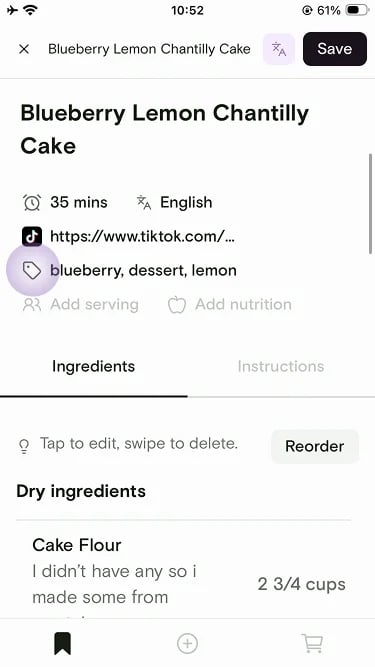
Open the recipe from your library and tap the tag row under the recipe details.
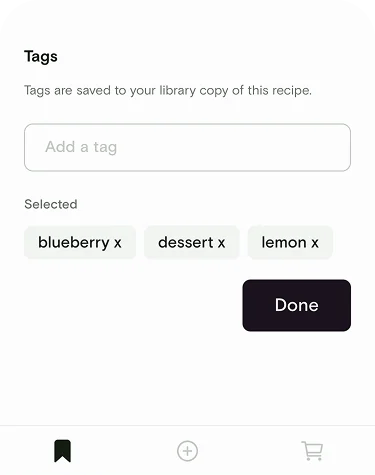
 Type a new tag in **Add a tag**, or tap the **x** on a selected tag to remove it. Tap **Done** when you're finished. Changes apply immediately in your library filters.
 ## Managing tags in your library
Rename tags, move them into the right category for library filters, or add new ones from Account settings.
On the Saved tab, tap your **profile** icon in the top right.
## Managing tags in your library
Rename tags, move them into the right category for library filters, or add new ones from Account settings.
On the Saved tab, tap your **profile** icon in the top right.
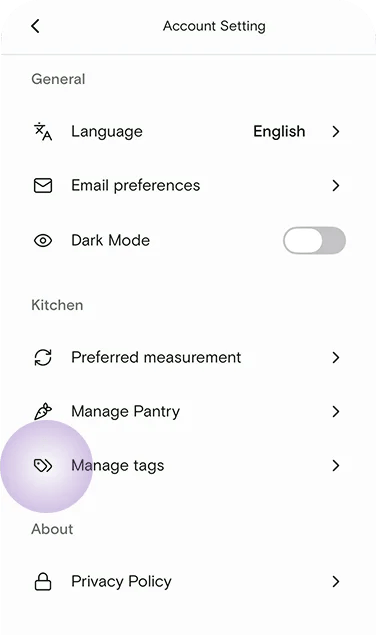
 Under **Kitchen**, tap **Manage tags**.
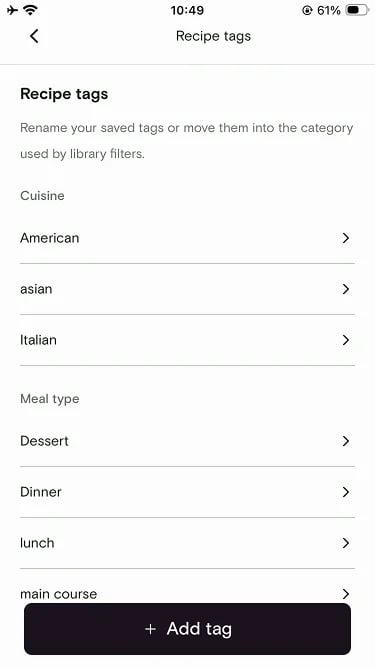
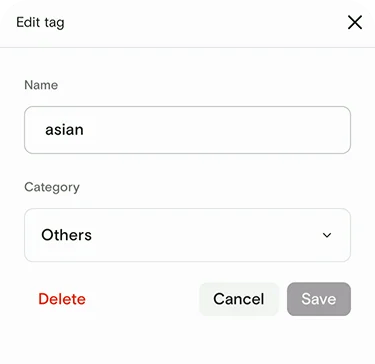
 Tags are grouped by category, such as Cuisine and Meal type. Tap **+ Add tag** to create a new one, or tap an existing tag to edit it.
 Change the tag name, pick a different category for library filters, or delete the tag. Then tap **Save**.
 ## Filtering your library by tag
Tags become powerful the moment you have more than a handful of recipes. In your library:
Open the filters drawer above your recipe list.
## Filtering your library by tag
Tags become powerful the moment you have more than a handful of recipes. In your library:
Open the filters drawer above your recipe list.
 Filter by any combination of cuisine, meal type, diet, main ingredient, cooking method, or more.
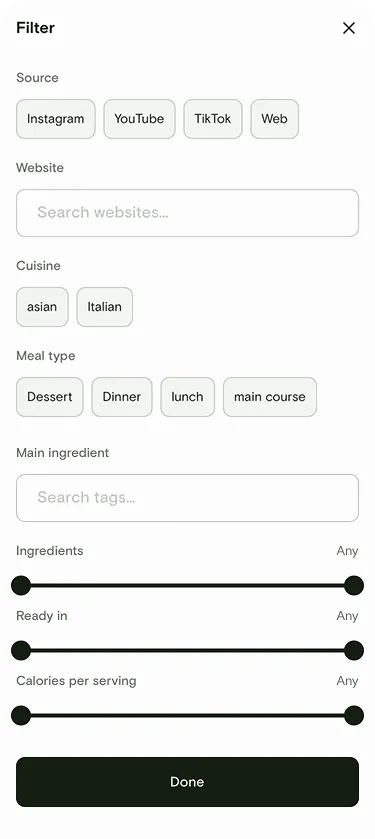 Your library instantly narrows to recipes that match all selected tags.
Combine a diet tag with a meal type — like **vegetarian** + **dinner** — to pull up an instant weeknight shortlist.
***
## Related articles
* [Organize and search](/using/organize-and-search)
* [Nutrition](/using/nutrition)
* [AI Discovery](/using/ai-discovery)
## Still need help?
If you have questions or run into anything unexpected, our team is happy to help. [Contact support](/troubleshooting/contact-support)
Your library instantly narrows to recipes that match all selected tags.
Combine a diet tag with a meal type — like **vegetarian** + **dinner** — to pull up an instant weeknight shortlist.
***
## Related articles
* [Organize and search](/using/organize-and-search)
* [Nutrition](/using/nutrition)
* [AI Discovery](/using/ai-discovery)
## Still need help?
If you have questions or run into anything unexpected, our team is happy to help. [Contact support](/troubleshooting/contact-support)