> ## Documentation Index
> Fetch the complete documentation index at: https://docs.trysouschef.com/llms.txt
> Use this file to discover all available pages before exploring further.
# How AI recipe search works in Souschef — AI Discovery
> Describe what you're craving and Souschef searches recipe websites, Instagram, TikTok, Facebook, and YouTube for matching recipes — import any with one tap.
Included in Free plan
Good news — AI Discovery is available to everyone using Souschef.
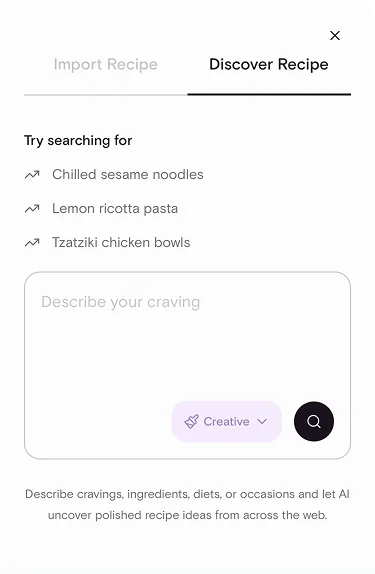
AI Discovery is Souschef's way of turning a vague craving into an actual dinner plan. Describe what you're in the mood for — the ingredients you want to use, what you're craving, your diet, or the occasion — and Souschef generates smart search queries and searches multiple sources at once. Results are grouped and easy to browse, and any recipe you like can be imported straight into your collection.
## What you can search for
Describe your meal in whatever way feels natural. AI Discovery is designed to understand:
* **Ingredients** — e.g., "chicken thighs and yogurt" or "whatever's in my Pantry"
* **Cravings** — e.g., "something spicy and comforting" or "crunchy and fresh"
* **Diets** — e.g., "high protein," "vegan," "gluten free"
* **Occasions** — e.g., "weeknight dinner for two," "party appetizer," "kid-friendly lunch"
You can combine any of these in a single prompt — the more you tell Souschef, the better the results.
## Choose a creativity level
Before running a search, pick how adventurous you want the results to be:
* **Precise** — sticks closely to your exact prompt. Best when you have a specific dish in mind.
* **Balanced** *(default)* — a good mix of closely matched and slightly more inventive suggestions.
* **Creative** — wider, more surprising results. Great for when you want inspiration.
 ## The sources AI Discovery searches
Souschef generates search queries from your prompt and then searches across:
* **Recipe websites**
* **Instagram**
* **TikTok**
* **Facebook**
* **YouTube**
Pinterest recipes may also appear in results.
## Understanding the results
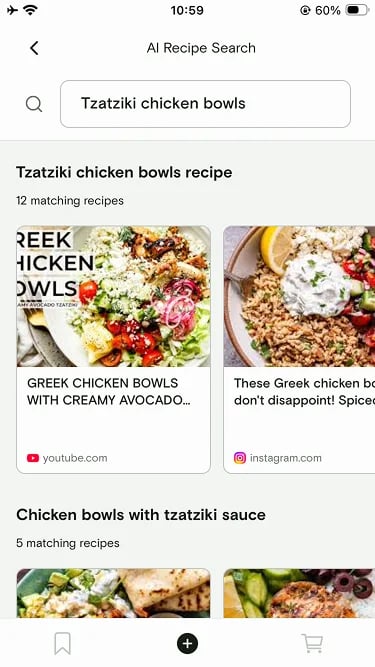
Results are grouped so you can scan them quickly:
* **Featured matches** — the recipes AI Discovery thinks are the strongest fit for your prompt, shown at the top.
* **Grouped results** — the rest of the results, organized by source (websites, Instagram, TikTok, Facebook, YouTube) so you can pick the format you prefer.
## The sources AI Discovery searches
Souschef generates search queries from your prompt and then searches across:
* **Recipe websites**
* **Instagram**
* **TikTok**
* **Facebook**
* **YouTube**
Pinterest recipes may also appear in results.
## Understanding the results
Results are grouped so you can scan them quickly:
* **Featured matches** — the recipes AI Discovery thinks are the strongest fit for your prompt, shown at the top.
* **Grouped results** — the rest of the results, organized by source (websites, Instagram, TikTok, Facebook, YouTube) so you can pick the format you prefer.
 ## Import a result into your library
Every result has two options:
* **Import directly** — tap **Import** and Souschef pulls the recipe into your library the same way any other import does. Ingredients, steps, tags, and nutrition are extracted automatically.
* **Open the original link** — tap the result to view the source (a website, Instagram post, TikTok, Facebook post, or YouTube video) in its original app or browser.
If a result looks interesting but you're not sure, import it — you can always
edit or delete it later. Importing is the fastest way to actually try a
recipe.
## How to run an AI Discovery search
Tap the **Discover** (or **Search**) tab in Souschef.
Type your ingredients, cravings, diet, or occasion into the prompt field.
Choose Precise, Balanced, or Creative.
Browse the featured matches at the top, then scroll through grouped results by source.
Tap **Import** to save a recipe, or tap the result to open the original source.
***
## Related articles
* [Supported import sources](/importing/supported-sources)
* [Import from Facebook](/importing/import-from-facebook)
* [Import from Instagram](/importing/import-from-instagram)
* [Import from TikTok](/importing/import-from-tiktok)
* [Import from YouTube](/importing/import-from-youtube)
## Still need help?
If you have questions or run into anything unexpected, our team is happy to help. [Contact support](/troubleshooting/contact-support)
## Import a result into your library
Every result has two options:
* **Import directly** — tap **Import** and Souschef pulls the recipe into your library the same way any other import does. Ingredients, steps, tags, and nutrition are extracted automatically.
* **Open the original link** — tap the result to view the source (a website, Instagram post, TikTok, Facebook post, or YouTube video) in its original app or browser.
If a result looks interesting but you're not sure, import it — you can always
edit or delete it later. Importing is the fastest way to actually try a
recipe.
## How to run an AI Discovery search
Tap the **Discover** (or **Search**) tab in Souschef.
Type your ingredients, cravings, diet, or occasion into the prompt field.
Choose Precise, Balanced, or Creative.
Browse the featured matches at the top, then scroll through grouped results by source.
Tap **Import** to save a recipe, or tap the result to open the original source.
***
## Related articles
* [Supported import sources](/importing/supported-sources)
* [Import from Facebook](/importing/import-from-facebook)
* [Import from Instagram](/importing/import-from-instagram)
* [Import from TikTok](/importing/import-from-tiktok)
* [Import from YouTube](/importing/import-from-youtube)
## Still need help?
If you have questions or run into anything unexpected, our team is happy to help. [Contact support](/troubleshooting/contact-support)