> ## Documentation Index
> Fetch the complete documentation index at: https://docs.trysouschef.com/llms.txt
> Use this file to discover all available pages before exploring further.
# Adjust recipe servings and scale ingredients in Souschef
> Scale any recipe up or down in Souschef. Change the serving size and all ingredient quantities recalculate automatically — no math needed.
Included in Free plan
Good news — adjusting servings is available to everyone using Souschef.
Whether you're cooking a cozy dinner for one or feeding a hungry crowd, Souschef takes the math out of scaling a recipe. Change the number of servings and every ingredient quantity updates instantly — no calculator required. When you share a recipe link, people viewing it in a browser can adjust servings too.
## How to adjust servings
Tap any recipe in your Souschef library to open it.
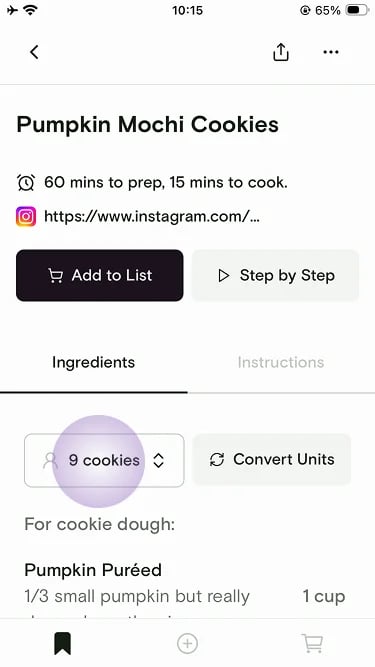
On the **Ingredients** tab, tap the servings button (for example, **9 cookies**).
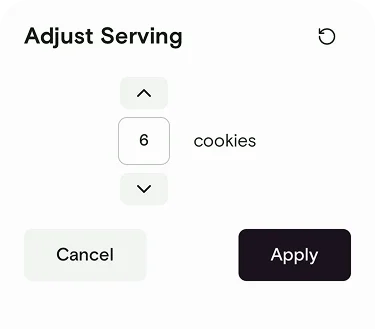
 Use the up and down arrows — or type a number — to set the new serving size, then tap **Apply**. All ingredient quantities recalculate automatically.
 You can also adjust servings in two other places:
* **Inside Cooking Mode** — change servings on the fly while you're actively cooking, and all ingredient references update in real time.
* **When adding to your shopping list** — adjust servings before adding ingredients to make sure you buy exactly the right amounts at the store.
Adjust servings before adding a recipe to your shopping list to get the right quantities for grocery shopping — that way your list is accurate from the start.
***
## Still need help?
If you have questions or run into anything unexpected, our team is happy to help. [Contact support](/troubleshooting/contact-support)
***
**Related articles**
* [Create and manage a shopping list](/using/shopping-list)
* [How to use Cooking Mode](/using/cooking-mode)
* [Convert measurements](/using/convert-measurements)
* [Print a recipe](/using/print-recipes)
* [Nutrition](/using/nutrition)
* [Supported devices](/getting-started/supported-devices)
You can also adjust servings in two other places:
* **Inside Cooking Mode** — change servings on the fly while you're actively cooking, and all ingredient references update in real time.
* **When adding to your shopping list** — adjust servings before adding ingredients to make sure you buy exactly the right amounts at the store.
Adjust servings before adding a recipe to your shopping list to get the right quantities for grocery shopping — that way your list is accurate from the start.
***
## Still need help?
If you have questions or run into anything unexpected, our team is happy to help. [Contact support](/troubleshooting/contact-support)
***
**Related articles**
* [Create and manage a shopping list](/using/shopping-list)
* [How to use Cooking Mode](/using/cooking-mode)
* [Convert measurements](/using/convert-measurements)
* [Print a recipe](/using/print-recipes)
* [Nutrition](/using/nutrition)
* [Supported devices](/getting-started/supported-devices)