> ## Documentation Index
> Fetch the complete documentation index at: https://docs.trysouschef.com/llms.txt
> Use this file to discover all available pages before exploring further.
# Create a recipe from pasted text or write one manually in Souschef
> Paste recipe text into Souschef and let AI extract the ingredients and steps, or write a recipe from scratch. Edit everything before saving.
Included in Free plan
Importing from plain text is included in the free version of Souschef.
Not every recipe comes with a nice URL. Family recipes handed down in a text message, notes from a cooking class, a copy-paste from an email newsletter — Souschef can turn all of these into structured recipes too. You can either paste the text and let Souschef's AI do the extraction, or create a recipe entirely by hand.
## Paste recipe text
Copy the recipe from wherever you found it — a Notes app, a text message, a webpage, an email, anywhere.
Tap the **+** button on your library screen to start a new import.
Select **Text** from the import options and paste your copied recipe into the text field.
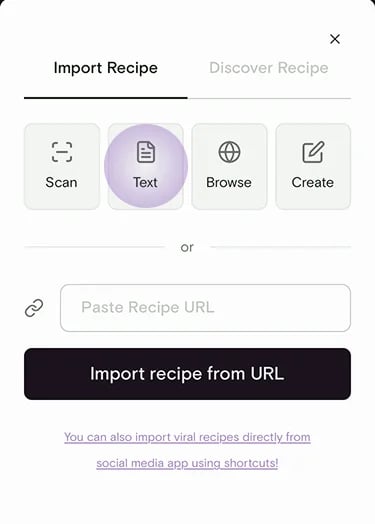 Souschef's AI reads the text and pulls out the title, ingredients, quantities, and step-by-step instructions — even if the original text was a messy paragraph.
Review the extracted recipe. Tap any field to fix a typo, adjust a quantity, or add a missing step. Tap **Save** when you're happy.
Paste as much or as little as you like. Even a single paragraph works —
Souschef will do its best to structure it into ingredients and steps.
## Create a recipe manually
Prefer to type it out yourself? You can build a recipe from scratch, no source required.
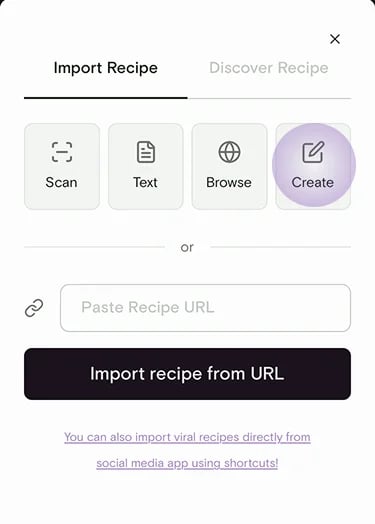
From the import menu, choose **Create** to start with a blank recipe.
Souschef's AI reads the text and pulls out the title, ingredients, quantities, and step-by-step instructions — even if the original text was a messy paragraph.
Review the extracted recipe. Tap any field to fix a typo, adjust a quantity, or add a missing step. Tap **Save** when you're happy.
Paste as much or as little as you like. Even a single paragraph works —
Souschef will do its best to structure it into ingredients and steps.
## Create a recipe manually
Prefer to type it out yourself? You can build a recipe from scratch, no source required.
From the import menu, choose **Create** to start with a blank recipe.
 Add a title, servings, prep and cook times, ingredients, and step-by-step
instructions. Add a photo if you have one.
Add a title, servings, prep and cook times, ingredients, and step-by-step
instructions. Add a photo if you have one.
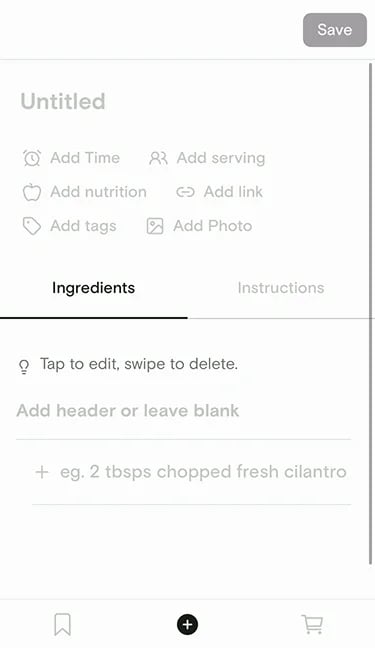 Tap **Save**. Your recipe is now in your collection, ready to cook, scale,
add to your shopping list, and share — just like any imported recipe.
Recipes you create manually work with every Souschef feature: [Cooking
Mode](/using/cooking-mode), [smart timers](/using/timers), [serving
adjustment](/using/adjust-servings), [shopping lists](/using/shopping-list),
[nutrition](/using/nutrition), [AI tagging](/using/ai-tagging), and more.
## Editing before saving
Whether you pasted text or wrote a recipe yourself, everything is editable before you hit **Save** — and just as editable after. Tap any ingredient, step, quantity, or title to change it. There's no wrong version to start from.
***
## Still need help?
Our team is always happy to assist — [contact support](/troubleshooting/contact-support).
## Related articles
* [Supported import sources](/importing/supported-sources)
* [Import from a website](/importing/import-from-website)
* [Import from photos](/importing/import-from-photos)
* [Why a recipe import might fail](/importing/why-import-fails)
Tap **Save**. Your recipe is now in your collection, ready to cook, scale,
add to your shopping list, and share — just like any imported recipe.
Recipes you create manually work with every Souschef feature: [Cooking
Mode](/using/cooking-mode), [smart timers](/using/timers), [serving
adjustment](/using/adjust-servings), [shopping lists](/using/shopping-list),
[nutrition](/using/nutrition), [AI tagging](/using/ai-tagging), and more.
## Editing before saving
Whether you pasted text or wrote a recipe yourself, everything is editable before you hit **Save** — and just as editable after. Tap any ingredient, step, quantity, or title to change it. There's no wrong version to start from.
***
## Still need help?
Our team is always happy to assist — [contact support](/troubleshooting/contact-support).
## Related articles
* [Supported import sources](/importing/supported-sources)
* [Import from a website](/importing/import-from-website)
* [Import from photos](/importing/import-from-photos)
* [Why a recipe import might fail](/importing/why-import-fails)