> ## Documentation Index
> Fetch the complete documentation index at: https://docs.trysouschef.com/llms.txt
> Use this file to discover all available pages before exploring further.
# Import Pinterest recipes into Souschef in three ways
> Import recipes from Pinterest into Souschef using the share menu, the in-app explorer, or by pasting a pin URL. Organize, scale servings, and cook without the clutter.
Included in Free plan
Importing from Pinterest is included in the free version of Souschef.
Pinterest is a wonderful place to discover recipe ideas, but keeping track of all those pins can quickly turn into a mess. With Souschef, you can import any Pinterest recipe directly into your collection — where you can scale servings, build a shopping list, and cook without the clutter. There are three ways to do it, so pick whichever works best for you!
## How to import a recipe from Pinterest
Already looking at a recipe pin in the Pinterest app? Share it straight to Souschef.
Open the pin you want to save, then tap the **Share** button (the arrow icon) below the image.
 In the **Share Pin link** menu, tap **More apps** to open your phone's share sheet.
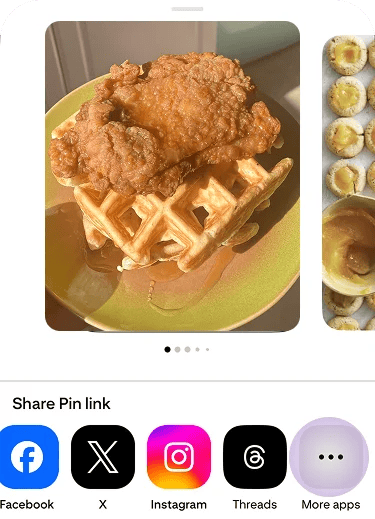 Tap the **Souschef** icon in the share sheet. Souschef will open and start extracting the recipe automatically.
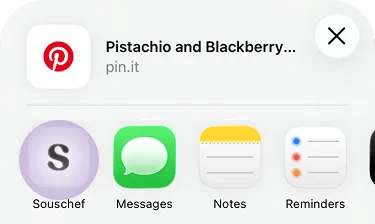 Don't see Souschef in the share sheet? Follow [Add Souschef to your share menu](/getting-started/add-to-share-menu).
Souschef will extract the recipe from the pin. This usually takes up to 30 seconds, and then your recipe will be ready to view, edit, and cook!
Souschef has a built-in Pinterest explorer that lets you browse and import recipes without ever leaving the app.
Open Souschef and tap the **+** button at the bottom of your collection.
On the import screen, tap the **Pinterest** logo to open the in-app explorer.
Don't see Souschef in the share sheet? Follow [Add Souschef to your share menu](/getting-started/add-to-share-menu).
Souschef will extract the recipe from the pin. This usually takes up to 30 seconds, and then your recipe will be ready to view, edit, and cook!
Souschef has a built-in Pinterest explorer that lets you browse and import recipes without ever leaving the app.
Open Souschef and tap the **+** button at the bottom of your collection.
On the import screen, tap the **Pinterest** logo to open the in-app explorer.
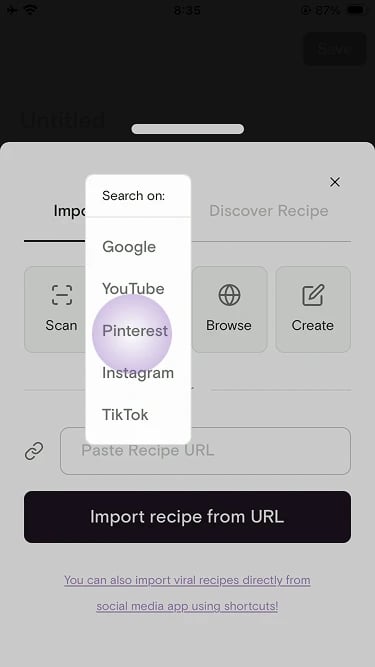 Browse recipes in the explorer, then select the one you want to import. Souschef will pull it into your collection.
Already have a Pinterest pin you want to save? You can paste the link directly into Souschef.
In the Pinterest app or in your browser, open the pin and copy its URL.
Open Souschef and tap the **+** button at the bottom of your collection.
Select **Import from URL** from the options.
Paste the pin URL and tap **Import**. Souschef will extract the recipe and add it to your collection.
Keep Souschef open while it processes the recipe — closing the app too early may interrupt the import.
## Why import Pinterest recipes into Souschef?
* **Turn inspiration into meals** — import recipes directly, then customize them, scale servings, and swap ingredients.
* **Smart shopping lists** — add all ingredients to your [shopping list](/using/shopping-list) in one tap, sorted by store section.
* **No more clutter** — keep everything in one place instead of juggling screenshots, links, and notes.
## Troubleshooting
If the recipe didn't import correctly or some details are missing, see [Why a recipe import might fail](/importing/why-import-fails) for common causes and what to do.
***
## Still need help?
Our team is always happy to assist — [contact support](/troubleshooting/contact-support).
## Related articles
* [Add Souschef to your share menu](/getting-started/add-to-share-menu)
* [Import from Facebook](/importing/import-from-facebook)
* [AI Discovery](/using/ai-discovery)
* [Why a recipe import might fail](/importing/why-import-fails)
* [Using your shopping list](/using/shopping-list)
* [All supported recipe sources](/importing/supported-sources)
Browse recipes in the explorer, then select the one you want to import. Souschef will pull it into your collection.
Already have a Pinterest pin you want to save? You can paste the link directly into Souschef.
In the Pinterest app or in your browser, open the pin and copy its URL.
Open Souschef and tap the **+** button at the bottom of your collection.
Select **Import from URL** from the options.
Paste the pin URL and tap **Import**. Souschef will extract the recipe and add it to your collection.
Keep Souschef open while it processes the recipe — closing the app too early may interrupt the import.
## Why import Pinterest recipes into Souschef?
* **Turn inspiration into meals** — import recipes directly, then customize them, scale servings, and swap ingredients.
* **Smart shopping lists** — add all ingredients to your [shopping list](/using/shopping-list) in one tap, sorted by store section.
* **No more clutter** — keep everything in one place instead of juggling screenshots, links, and notes.
## Troubleshooting
If the recipe didn't import correctly or some details are missing, see [Why a recipe import might fail](/importing/why-import-fails) for common causes and what to do.
***
## Still need help?
Our team is always happy to assist — [contact support](/troubleshooting/contact-support).
## Related articles
* [Add Souschef to your share menu](/getting-started/add-to-share-menu)
* [Import from Facebook](/importing/import-from-facebook)
* [AI Discovery](/using/ai-discovery)
* [Why a recipe import might fail](/importing/why-import-fails)
* [Using your shopping list](/using/shopping-list)
* [All supported recipe sources](/importing/supported-sources)