> ## Documentation Index
> Fetch the complete documentation index at: https://docs.trysouschef.com/llms.txt
> Use this file to discover all available pages before exploring further.
# Recipes appear to be missing from Souschef
> If your saved recipes have disappeared from Souschef, find out why and how to get them back in a few steps.
If you open Souschef and your recipes aren't there, take a breath — they're most likely not gone! There are a few common reasons a recipe collection might appear empty or incomplete, and most of them are solved in just a step or two. Here's what to check.
Recipes that were imported while not signed in may not sync to the cloud. Always sign in to make sure your collection is safely backed up.
Your recipes are tied to the account you used when you saved them. If you're signed in with a different email address, your collection will look empty.
**To fix this:**
1. Go to the Account or Settings section in Souschef.
2. Sign out of your current account.
3. Sign back in using the email address you originally used to save your recipes.
Your recipes should reappear right away.
Switched to a new phone? Your recipes are stored with your account, not on the device itself — so you just need to sign in to get them back.
Sign in to Souschef on your new device using your existing account credentials, and your recipe collection should sync automatically. For more help with this, see [Sign in on another device](/account/sign-in-another-device).
Sometimes the app just needs a nudge to load the latest data.
1. Close Souschef completely (force-quit the app).
2. Reopen it.
3. Once the recipe list is visible, pull down from the top to trigger a manual refresh.
If your recipes were there before, they should reappear after the refresh.
If you deleted and reinstalled Souschef, your recipes aren't gone — they're still tied to your account in the cloud. Simply sign back in with the same account you used before, and your collection will be restored.
If you believe your recipes may have been saved in an offline or local-only mode, please [contact our support team](mailto:support@nekonote.co) and we'll help you figure out what happened and whether those recipes can be recovered.
## Check your Imported Recipes history
If a recipe seems missing because you're not sure whether an import actually finished, check the **Imported Recipes** tab on your **Bookmarks** screen. It shows a device-local history of your recipe import attempts, grouped by day — so you can see exactly what you tried to save and when.
From this history you can:
* **Open successful imports** to jump straight to the saved recipe.
* **Retry certain failures** with one tap.
* **Report unsupported sites** to help us improve Souschef's coverage.
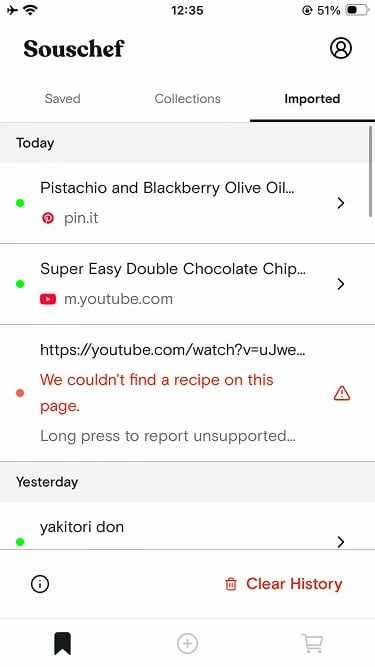 Imported Recipes history is **capped at 50 items and 30 days**, and it's stored **on your device only** — it doesn't sync across devices. It's a lookup tool for recent import attempts, not a replacement for saving recipes to your bookmarks. Always save any recipe you want to keep.
## Still need help?
If you've tried everything above and your recipes still aren't showing up, we'd love to help you track them down. Email us at [support@nekonote.co](mailto:support@nekonote.co) with a description of the situation, or visit our [contact support page](/troubleshooting/contact-support).
## Related articles
* [Sign in on another device](/account/sign-in-another-device)
* [Contact Souschef support](/troubleshooting/contact-support)
Imported Recipes history is **capped at 50 items and 30 days**, and it's stored **on your device only** — it doesn't sync across devices. It's a lookup tool for recent import attempts, not a replacement for saving recipes to your bookmarks. Always save any recipe you want to keep.
## Still need help?
If you've tried everything above and your recipes still aren't showing up, we'd love to help you track them down. Email us at [support@nekonote.co](mailto:support@nekonote.co) with a description of the situation, or visit our [contact support page](/troubleshooting/contact-support).
## Related articles
* [Sign in on another device](/account/sign-in-another-device)
* [Contact Souschef support](/troubleshooting/contact-support)